Technical Quality
By Ali Ghorbani · Published Feb 23, 2026 · Updated Mar 17, 2026
Sharp focus, proper exposure, and controlled noise form the technical foundation of a great photograph. You can have perfect composition and beautiful light, but if the image is soft, blown out, or riddled with grain, it won't hold up. Understanding how aperture, shutter speed, and ISO interact — the exposure triangle — gives you complete creative control over your camera.
The Exposure Triangle
Three settings control how much light reaches your sensor: Aperture (how wide the lens opens, measured in f-stops), Shutter Speed (how long the sensor is exposed), and ISO (how sensitive the sensor is to light). These three form a triangle — changing one requires adjusting at least one other to maintain the same exposure. The creative power comes from choosing which two you prioritize. Want a blurred background? Open the aperture (low f-number). Want to freeze action? Use a fast shutter speed. Shooting in low light? Raise ISO, but accept more noise.
Aperture (f-stop)
f/1.8 – f/4: Wide open. Shallow depth of field, blurred backgrounds. Great for portraits and isolating subjects.
f/8 – f/16: Stopped down. Deep depth of field, everything sharp. Great for landscapes and architecture.
Shutter Speed
1/1000s+: Freezes fast action. Sports, birds in flight, splashing water.
1/60 – 1/250s: General handheld range. Stops everyday motion.
1s – 30s: Long exposure. Silky water, star trails, light painting. Requires a tripod.
ISO
100 – 400: Low noise, maximum detail. Use in bright conditions or with a tripod.
800 – 3200: Moderate noise. Acceptable for most indoor and low-light handheld shooting.
6400+: High noise. Use only when you must have a fast shutter speed and can't open the aperture further.
Sharpness & Focus
Sharpness is the single most common reason a technically sound composition still fails. Three things cause soft images: missed focus, camera shake, and diffraction. For missed focus, use single-point AF and place the focus point exactly on your subject's nearest eye (for portraits) or on the most important part of the scene. For camera shake, follow the reciprocal rule: your shutter speed should be at least 1/focal length (e.g., 1/200s for a 200mm lens). Image stabilization buys you 2–4 stops, but it can't save you from very slow speeds handheld. For diffraction, avoid shooting past f/16 on most cameras — diffraction softens the entire image at very small apertures.
 Good Example
The eye is in perfect focus, immediately drawing the viewer in. The shallow depth of field blurs the background just enough to separate the subject.
 Needs Work
At wide apertures, the depth of field is razor thin. Focus on the ear instead of the eye and the portrait feels subtly wrong, even if the viewer can't explain why.
Depth of Field
Depth of field (DoF) is how much of the scene is in acceptable focus from front to back. Three things control it: aperture (wider = shallower DoF), focal length (longer = shallower DoF), and distance to subject (closer = shallower DoF). Use shallow DoF to isolate a subject and eliminate distracting backgrounds. Use deep DoF when you want everything sharp — landscapes, architecture, group photos. The “hyperfocal distance” technique lets landscape photographers maximize sharpness from foreground to infinity by focusing at a specific distance rather than at infinity.
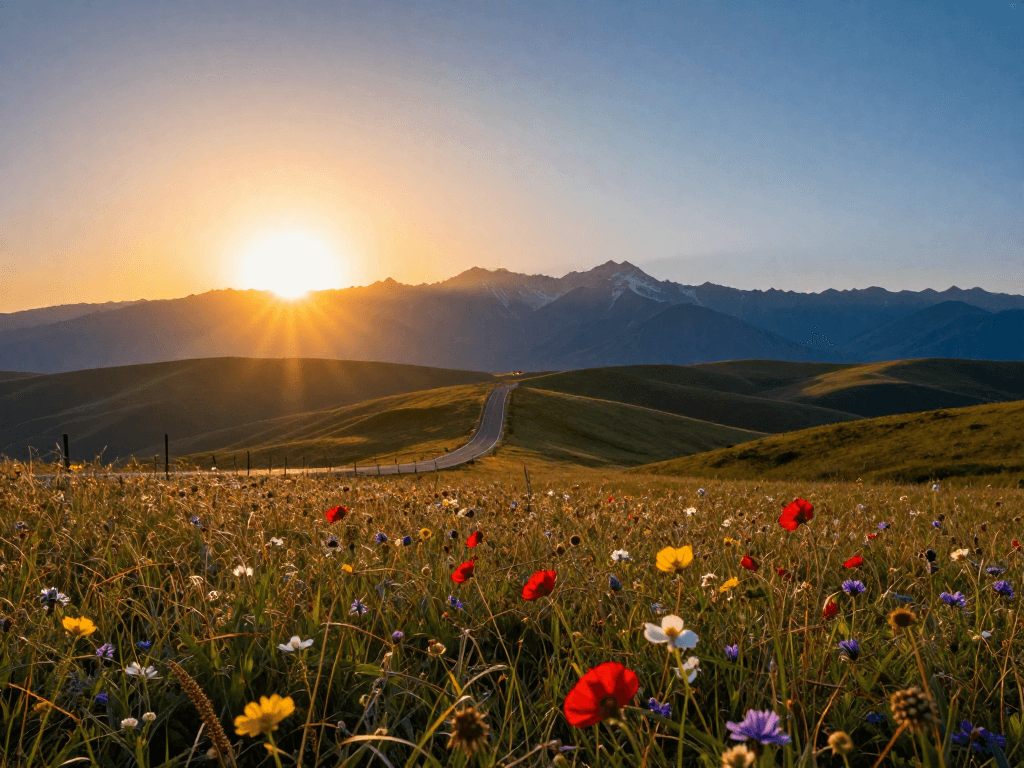 Good Example
By focusing at the hyperfocal distance and using f/11, everything from a few feet in front of the camera to infinity is acceptably sharp.
 Needs Work
Focusing at infinity with a wide aperture means the foreground goes soft. If you included foreground elements for depth, they need to be sharp too.
Exposure & Histograms
Your camera's histogram is the most reliable exposure tool you have. It shows the distribution of tones from pure black (left) to pure white (right). A well-exposed image generally has data spread across the full range without spiking hard against either edge. A spike on the right (“clipping highlights”) means you've lost detail in bright areas — blown-out skies and white dresses are common culprits. A spike on the left (“crushed shadows”) means you've lost detail in the darks. When shooting RAW, “expose to the right” (ETTR) — make the image as bright as possible without clipping — to maximize the data captured by the sensor. You can always darken in post, but you can't recover what was never recorded.
Quick Technical Tips
- •Use the lowest ISO possible to minimize noise. Increase only when you need faster shutter speeds or narrower apertures and can't add light.
- •For sharp handheld shots, keep your shutter speed at least 1/focal-length (e.g., 1/50s for a 50mm lens, 1/200s for a 200mm lens).
- •Shoot in RAW format. It preserves maximum detail and gives you far more flexibility to correct exposure and white balance in post.
- •Check your histogram, not your LCD screen. The screen brightness is misleading — the histogram never lies about exposure.
- •Use back-button focus to separate focus from the shutter button. This gives you more control over when and where to lock focus.
- •For group photos, use f/5.6 to f/8 to ensure everyone is in focus. At f/2.8 with a group, someone will be soft.
- •Enable 'highlight alert' (blinkies) in your camera to instantly see blown-out areas on the LCD review.
- •Clean your lens and sensor regularly. A smudge or dust spot that's invisible to the eye shows up as a soft patch or spot in your images.
- •Learn to use exposure compensation (+/-). In tricky scenes (snow, backlight, dark backgrounds), your meter will be fooled — dial in compensation to correct it.